There’s a moment almost everyone hits. You’ve been making music on a laptop for a while, you buy your first real microphone, plug it into the computer with an adapter, hit record and get back a faint, hissy whisper of your own voice.
That’s usually the day someone tells you to “just get an interface”. So what is it, and do you need an audio interface yet? Not everyone does. Here’s how to tell.
So what is a Focusrite, anyway?
Focusrite is a brand, not a thing. People say “a Focusrite” the way they say “a Kleenex”, and what they mean is a small box called an audio interface. The red Scarlett ones are on half the bedroom desks on Instagram.
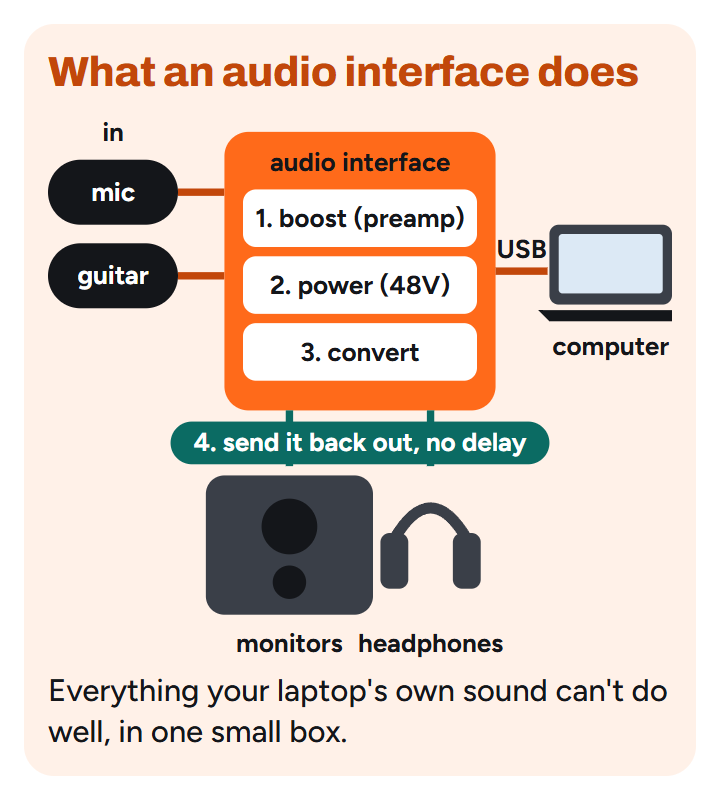
An audio interface sits between your gear and your computer, and it does four jobs your laptop can’t do well on its own. It gives a microphone the clean boost it needs (a preamp), plus the 48 volts a condenser mic needs to work at all. It turns that sound into numbers your computer can record, without the hiss and hum of a laptop’s built-in input. It sends sound back out to proper studio monitors and headphones. And it does all of this fast enough that you can hear yourself while you record, without a distracting delay.
Your laptop’s headphone jack can’t do the first job at all. Plug a proper XLR mic into it with an adapter and you’ll get a whisper buried in noise. That’s usually the day people go looking for an interface.
Notice what’s not on that list: making your music sound better. An interface doesn’t add magic. It just stops your computer from getting in the way.
When you need one
You want to record a microphone. Any XLR mic needs a preamp, and a condenser also needs that 48 volts, called phantom power. This is the interface’s main job. (A USB mic is the exception: it has a tiny interface built into its body. More on that below.)
You want to record a guitar or bass. A guitar plugged into a laptop sounds thin and noisy. An interface’s instrument input, often labelled “Inst” or “Hi-Z”, is built for exactly that signal.
You want studio monitors. Monitors want a clean signal from proper outputs. A laptop’s headphone jack can technically feed them, but it’s noisy, and it makes the cheapest part of your setup the weakest link in front of the speakers you just paid for. If monitors are on your list, our best studio monitors at every price starts at under $100 a pair.
You want to hear yourself as you record. Recording through a laptop’s built-in sound usually adds a delay between singing a note and hearing it back, and even a little is enough to throw off your timing. An interface lets you hear yourself straight from the input, with no delay at all.
When you don’t, yet
If you make beats entirely inside your DAW, with software instruments, samples and a pair of headphones, you can wait. Your laptop’s headphone output is fine for that, and a USB MIDI controller plugs straight into the computer without an interface.
So do you need one? NO, not yet. Put the money into good headphones or a MIDI keyboard first, and buy the interface the day you want to record something real or add monitors.
The other exception is a USB microphone. If all you’ll ever record is your own voice, for a podcast or a stream, a USB mic does the interface’s job by itself. The trade-off is that it can’t grow with you: no second mic, no guitar input, no outputs for monitors.
How many inputs?
For a first interface, the real question is how many things you’ll record at the same time. One mic or one guitar at a time? One input is enough. Your voice and your guitar together, or two voices for a duet or a podcast guest? Get two.
That’s most of the decision. Every current interface from a reputable maker records cleanly enough for a first studio, so the numbers on the box (24-bit, 192 kHz) matter far less than the marketing suggests. If you’re curious what they mean, here’s sample rate and bit depth, explained.
Our pick: Focusrite Scarlett 2i2 (4th Gen)
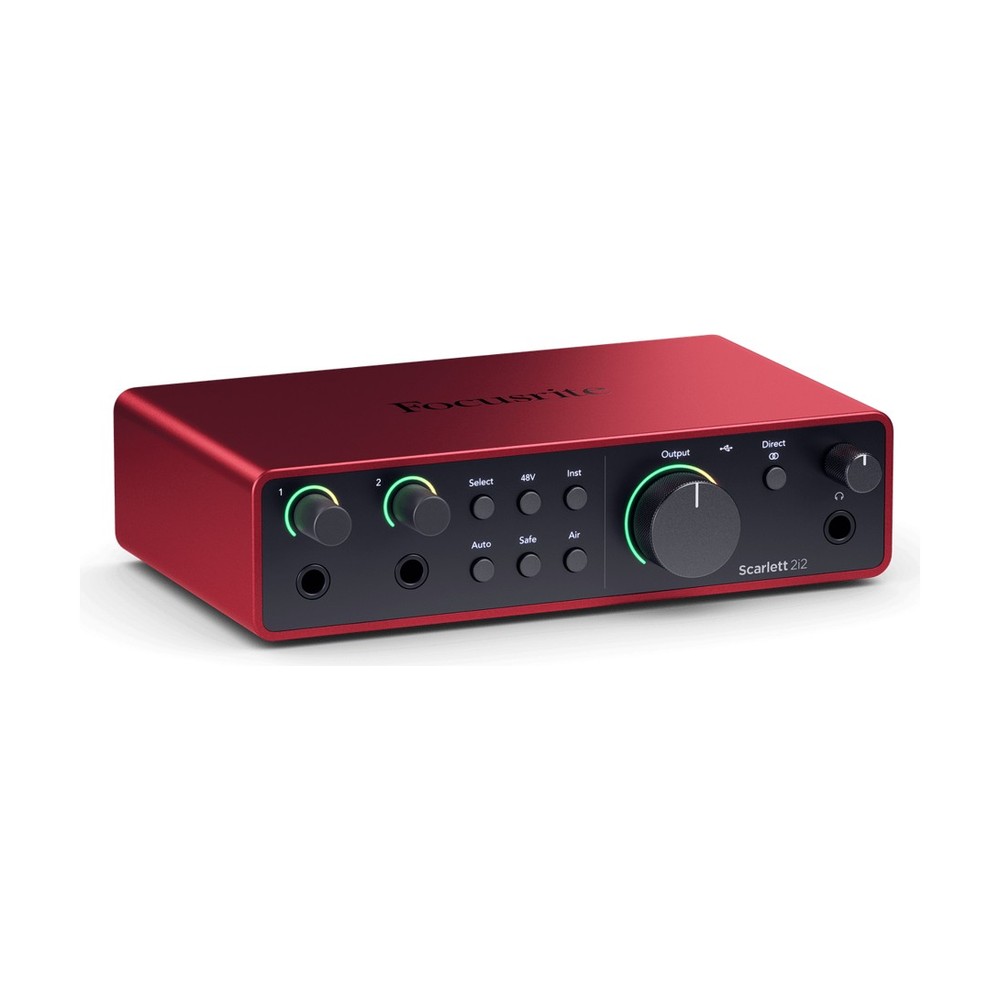
Two inputs that each take a mic or a guitar, phantom power for condensers, two outputs for monitors, a headphone jack and USB-C. That covers nearly every first studio. The 4th Gen adds an Auto Gain button that listens to you for a few seconds and sets your input level, and a Clip Safe mode that turns the level down if you suddenly get loud. Both take the guesswork out of the part beginners most often get wrong.
The catch: two inputs is the ceiling. Record a drum kit or a full band and you’ll need a bigger box. And if you’ll only ever record one thing at a time, you’re paying for an input you won’t use.
Even so, it’s the one we’d buy first. It does everything a first studio asks of it, and it won’t feel small the day you add a second mic. We reviewed the older Scarlett 2i2 back in 2019, and the case for it has only got stronger.
If it’s only ever one thing: Focusrite Scarlett Solo (4th Gen)
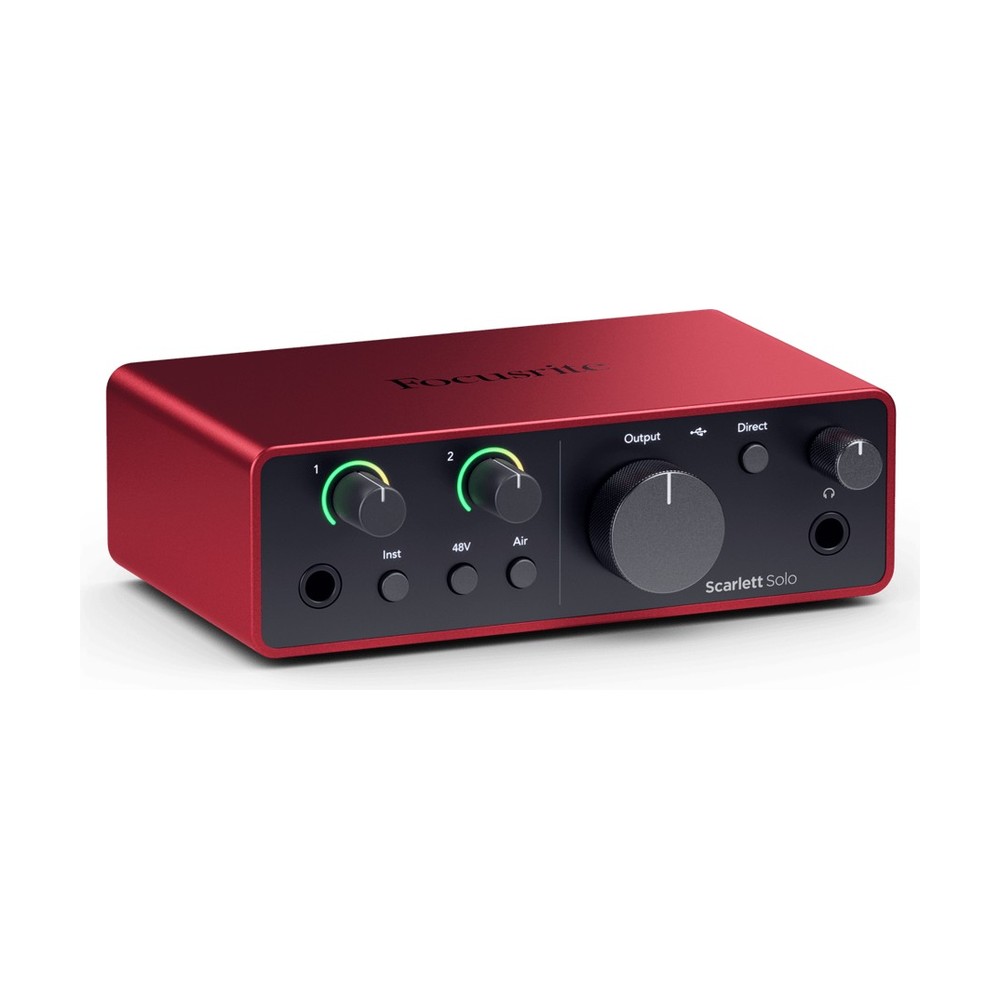
The Solo has one mic input and one guitar input, so you can record your voice, your guitar, or one of each at the same time, but never two mics. If that’s all you need, it costs less than the 2i2 and gives you the same clean recording and the same outputs for monitors and headphones.
The catch is simply that ceiling. The day you want a second mic, you’re buying another interface.
Setting it up in five minutes
Interfaces look intimidating with all their knobs, but the first session goes the same way every time.
Plug it in and pick it. Connect the interface to your computer, then open your DAW’s audio settings and choose the interface for both input and output. Most current interfaces work on a Mac without installing anything; on Windows, install the maker’s driver first.
Connect your mic or guitar. Mic cable into the input, or guitar cable with the input switched to “Inst”. If it’s a condenser mic, press the 48V button. If it’s a dynamic mic, leave 48V off; it doesn’t need it.
Set the level. Sing or play at your loudest while you turn the gain knob until the ring around it glows green and only flickers amber on the loudest moments. Red means turn it down. On the 2i2, the Auto Gain button does this for you.
Hear yourself. Plug your headphones into the interface, not the computer, and turn on direct monitoring so you hear your voice with no delay.
That’s it. Hit record.
What not to pay for yet
More inputs than you’ll use, boutique converters and bundles full of extras you’ll never open. At this stage the money does more good elsewhere: on the mic, on headphones, or on doing something about your room’s acoustics.
Happy producing.