Yamaha Steinberg UR12 Audio Interface


Introducing the Yamaha Steinberg UR12
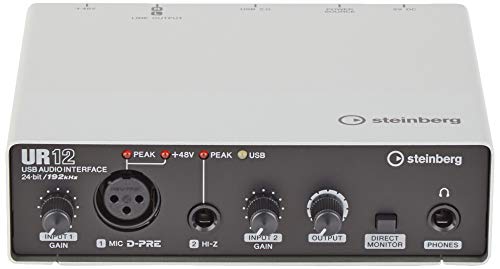
Getting started with home recording often means navigating a sea of complex and feature-packed devices. The Yamaha Steinberg UR12 (see current price), however, stands out for its simplicity. As a compact USB audio interface with just the basics—one microphone input, one instrument input, RCA outputs, and a headphone jack—it’s designed so you can focus more on recording and less on setup.
If you’re looking for lots of extra controls or premium visual appeal, the UR12 might feel too stripped-down. But for newcomers eager for reliability and quality in a user-friendly format, its streamlined design has distinct advantages.
The Yamaha and Steinberg Partnership
The roots of the UR12’s appeal stem from a partnership between two industry leaders: Yamaha and Steinberg. Yamaha brings hardware craftsmanship, while Steinberg is renowned for its software, particularly the Cubase digital audio workstation (DAW).
This collaboration aims to create accessible, plug-and-play interfaces compatible with all major recording software, giving beginners a seamless entry point. The UR12 sits at the entry level of their lineup and even includes a license for Cubase AI, so you can begin recording out of the box. If you’re interested in the background of this partnership and how it began, you can read more about Yamaha’s acquisition of Steinberg and the strategic collaboration that followed.
Design and Build: Simple, Sturdy, and Portable
Before you even plug it in, the UR12’s design makes a positive first impression. About the size of a paperback book, it easily fits on crowded desks or in a backpack for mobile setups. The minimalist layout helps it blend into your workspace and keeps controls clearly labeled for a stress-free user experience.
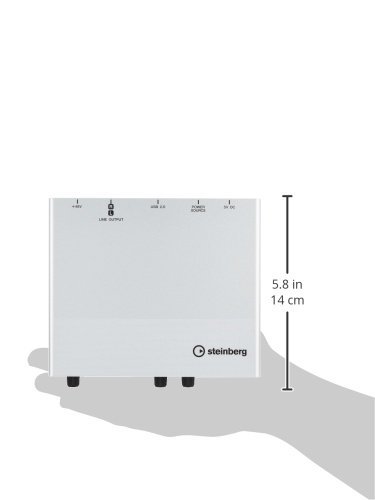
Its metal chassis provides a reassuringly sturdy feel, while plastic end panels keep weight and cost down. The front panel keeps all key controls and inputs within easy reach, while outputs and the USB connection are tucked neatly in back. There’s even a dedicated phantom power switch at the rear, letting you use condenser microphones when needed. Overall, the layout is tailored for beginners who want to avoid confusion and jump straight into creating.
While the build quality isn’t on the level of much pricier gear, taking reasonable care of the UR12 should ensure it lasts through years of project sessions and practice. Just avoid repeated heavy impacts—and keep in mind, no device at this level is truly indestructible.
Features and Technical Specs: What’s Under the Hood?
The UR12 is designed to be all you need—and nothing you don’t—as you get started with home recording.
Essential Inputs and Outputs
With a single XLR mic input powered by Yamaha’s respected D-PRE preamp, and a Hi-Z instrument input for guitar or bass, the UR12 fits solo musicians, vocalists, or podcasters who record one part at a time. Each input has its own gain control. The outputs consist of unbalanced RCA jacks for connecting speakers (adequate for most home setups) and a standard headphone jack for silent monitoring.
Audio Quality, Preamp, and Converters
Sound is at the heart of any audio interface, and the UR12 delivers. Its D-PRE microphone preamp delivers clean, quiet gain without adding unwanted coloration—similar to what you’d find in some of Yamaha’s more expensive models. Its 24-bit/192 kHz converters provide detail and clarity well above what beginner projects usually demand. In short, you’ll get honest, transparent recordings that let your voice or instruments shine without distraction.
Phantom Power, Compatibility, and Software
The UR12 includes 48V phantom power via a rear switch, meaning it’s ready for condenser mics as well as dynamic ones. It runs on USB power—no need for extra adapters—keeping setups tidy and portable. The interface is compatible with Windows, Mac, and (with the right adapter) some iOS devices. Installation is generally straightforward, and the bundled Cubase AI software gives you a DAW that’s intuitive for beginners but powerful enough for serious projects.
How Does It Perform? Real-World Sound and Experience
For beginners, knowing that their interface won’t bottleneck performance is crucial. The UR12 excels here.
Sound Quality and Transparency
Whether recording vocals, podcast dialogue, or direct-input guitar, the UR12’s audio is neutral and clear. The D-PRE preamp continues to impress for an entry-level device: it doesn’t add any unique color or character, but handles a wide range of microphones and styles with professionalism.
Latency, Monitoring, and Driver Stability
Direct hardware monitoring virtually eliminates latency, making it easy to hear yourself in real time as you record. This feature is especially valuable for singers and podcasters. Should you need to monitor through your software (the DAW), typical USB2 latency is manageable for most uses. Unless your sessions are heavily layered or you’re running virtual instruments live, the UR12 is fast enough.
Stability matters, too—the UR12’s drivers are solid, working well across major DAWs on most modern systems. Only extremely old computers or crowded USB setups rarely pose challenges here, giving you dependable operation for daily use.
Who Will Benefit Most?
The UR12 is ideal for:
- Solo podcasters and streamers
- Home musicians recording vocals or instruments one track at a time
- Voiceover artists or YouTubers ready to step beyond basic USB mics
- Anyone craving a compact, portable, and reliable interface
If you ever plan to record multiple mics or instruments simultaneously, or want a permanent studio setup that can grow over time, a more advanced model is worth considering.
Strengths, Weaknesses, and How the UR12 Compares
Every piece of gear has its tradeoffs. It’s helpful to weigh the benefits and limits of the UR12 as you consider where it fits in your setup.
Advantages
- Compact, metal chassis for durability and portability
- Excellent D-PRE mic preamp for clean, transparent audio
- User-friendly, minimal setup—great for beginners
- USB-powered for convenience
- Stable, cross-platform drivers
- Bundled software makes it easy to start recording
Drawbacks
- Only one mic and one instrument input (no multi-mic recordings)
- RCA outputs are unbalanced, which can introduce noise with some speaker setups
- No MIDI support for keyboards or controllers
- Plastic end panels are a potential weak spot for rough handling
- Lacks onboard DSP, advanced routing, or modular upgradability
How It Stacks Up Against Competitors
When comparing the UR12 to other beginner-friendly interfaces, a few alternatives stand out:
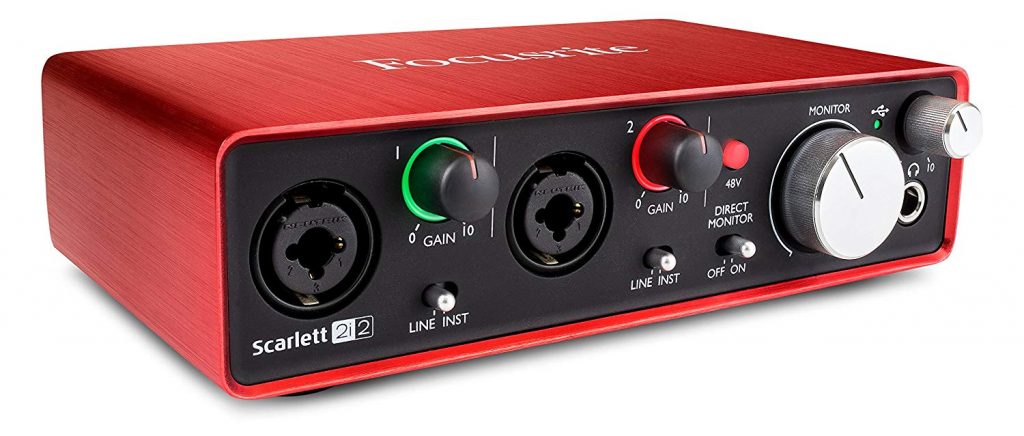
- Focusrite Scarlett Solo: Offers balanced outputs, an equally strong preamp, improved build, and more bundled software at a slightly higher price. If you care about balanced connections, this might be the better pick.
- PreSonus AudioBox USB 96: Adds a second input, MIDI I/O, and balanced outputs. If you might use MIDI or expect to expand your recording setup, the PreSonus offers greater flexibility (though it is a bit bulkier).
- Behringer UMC22: The most affordable alternative, but it’s weaker on noise performance and build quality. Only consider this if your budget is very tight.
The UR12 distinguishes itself with its D-PRE preamp, seamless Cubase integration, and dependability in a no-nonsense format. Its limitations make it best for simple, one-track recording—perfect for many solo creators.
Is the UR12 Good Value?
For its price, the UR12 offers high-quality basics and all the essential features to get started. If you foresee needing more channels, MIDI capability, or long-term upgradability, you may want to invest in a more expensive and flexible device early on. However, for those intent on keeping things simple and streamlined, the UR12 gets the job done affordably and efficiently.
When Should You Look Elsewhere?
The UR12 isn’t for everyone. You’re better off exploring different options if:
- You need to record with multiple microphones or instruments at once
- Your workflow relies heavily on MIDI gear and you lack a separate MIDI interface
- You expect to scale up your studio soon and want a device that grows with your needs
- Balanced outputs or advanced routing are necessary for your monitors or outboard gear
Final Verdict: Should You Choose the UR12?
For beginners, solo podcasters, and home musicians, the Yamaha Steinberg UR12 offers a worry-free entry into audio recording. It’s easy to use, sounds great, and covers all the essentials without overwhelming the user. If your creative pursuits stay within its limitations, few devices in its class deliver a better experience for the price. As your skills and ambitions grow, you might outgrow its single-input design or lack of MIDI—but as a first step into home audio, the UR12 provides a confident start.
If you already know you’ll need to accommodate multiple sources, integrate MIDI gear, or want to expand your studio over time, choosing a more versatile interface will offer better long-term value. But if you’re ready to start recording now, with a focus on ease and sound quality, the UR12 is an excellent choice.